Read without distractions
Foragd fetches the full article text directly from the source, so you get clean, readable content even when a feed only publishes a summary. Beautiful typography, theme support, and no ads mean the content always comes first.
Get Full Content
For subscriptions where only article summaries are shown, Foragd fetches and displays the remote content (pulling in images and other relevant content) to recreate the reading experience without switching browser tabs.
Geo Support
If your subscriptions have geo coordinates (i.e., lat/long), then you can view a world map with articles shown where they were posted. Browse content by location and see all posts/images happening in a particular city, country or geographical area.
Full-text Search, for Humans
Search by keyword or phrase, and filter by category, author or time period. Or use semantic search to search by topic like "current geopolitical events" or the "latest tech news" instead of exact wording.
Want to keep up with new results? Save them as a Search Subscription and stay up to date automatically.
Zero Pressure Reading
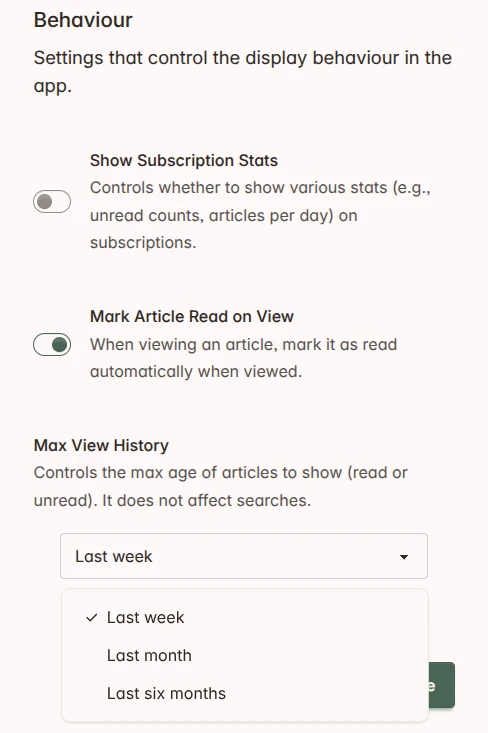
Reading shouldn't feel like a chore. Foragd lets you toggle unread counts on and off (off by default) for zero-pressure reading that doesn't feel like another inbox to clear.
- Automatically mark articles as read after a short viewing period
- Set a timespan after which old articles disappear from view, taming the backlog
Read more on the blog:
Save Favorite Subscriptions and Articles
Favorite subscriptions to keep them top and center. Favorite articles to reference them later. Favorite articles are kept forever, even if the source removes them from their feed.
Choose Your Theme
Pick from a selection of curated light and dark themes, so your reading space looks the way you want it to.
Try it out:
Foragd ranked best feed reader
By Immanent Tech
Responsive Design
Foragd is built with a responsive design that will adapt to the screen size of your device. It works in any browser on any device. Stay up to date on your desktop, mobile, tablet or smart TV.
Ready to read without the noise?
Start free. No credit card, no algorithm, no catch.
Start your free trial