How to Manage Feed Overload: 6 Strategies for Your RSS Reader
Feeling overwhelmed by your RSS feeds? Learn six practical strategies including turning off unread counts, using filters and grouping subscriptions to take back control of your reading.
Feed overload is one of the commonest reasons people abandon RSS readers. Use your feed reader’s tools to take back control and beat the overload. The six strategies below will help you go from a chaotic flood of articles to a calm, manageable reading list.

Drowning in Content
In any modern social media or feed viewer service, your feed is a central stream of information. However, the sheer volume of content and rate of updates can be overwhelming, to downright crippling.
In this article, we go through some strategies on how to manage this overload, and talk about how Foragd can help.
6 Strategies for Managing RSS Feed Overload
Stop Caring About Unread Counts
Remember “Inbox Zero”? Where you tried to keep your email inbox empty? Hands up if you actually achieved, let alone maintained it? If you didn’t raise your hand, don’t worry, you are in the majority. While a noble concept, this was practically impossible. Similarly, why do feed readers insist on showing you an unread count? It is a phantom obligation; you didn’t ask for the cognitive pressure from it, yet these services demand you make the number go down.
Foragd does not display unread counts by default. You can turn them on if you want them, but hiding them by default is a deliberate design decision to create space for discovery and novel navigation, not frantic “number must go down” skimming.
As a further control, Foragd has an option to allow you to hide all unread articles older than a given period, like the last week. So even with unread counts off, your articles never pile up.
Look for a feed reader where you can turn off unread counts. Foragd can, but many of the popular readers unfortunately don’t.
Filter by Keywords/Phrase to Remove Noise
Often different subscription sources will contain some posts that you don’t want to see. Maybe it’s a topic or area you aren’t interested in, or, worse, promoted or sponsored content. In these cases, you need a way to filter posts. Ideally a good feed reader will offer this post filtering for you, and you should be able to filter by phrase, keyword, category, or, author.
This shouldn’t be an add-on, it is mandatory in the modern age of information overload. Secondly, it shouldn’t be difficult or complicated. Most of the time, you’ll probably just want to filter out posts with a particular keyword, phrase, or category. You shouldn’t need to learn programming constructs or use a complicated filter building interface just to say “don’t show me posts mentioning secret pizza parties”.
Foragd makes this very easy. For any subscription, you can filter with “this not that” logic:
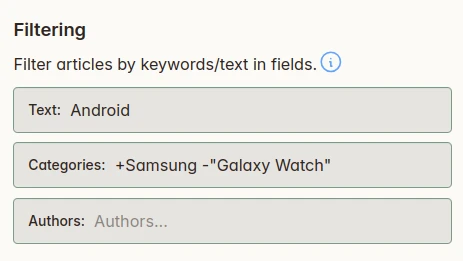
In this screenshot, we are using the simple but powerful filtering features in Foragd to:
- Match articles that contain the word
Android. - Include articles with the category
Samsung. - Exclude articles with the category
"Galaxy Watch"(phrase match)
With these simple +/- operators and some keywords/phrases, you can easily filter to the content you are interested in.
Look for a feed reader that allows filtering by default and doesn’t make it overly complicated.
Combine Sources with Group Subscriptions
Another useful trick for a feed reader is a way to aggregate or combine multiple subscription sources into a single view. That allows for less context switching and potentially deduplication. In Foragd, we call this a Group Subscription.
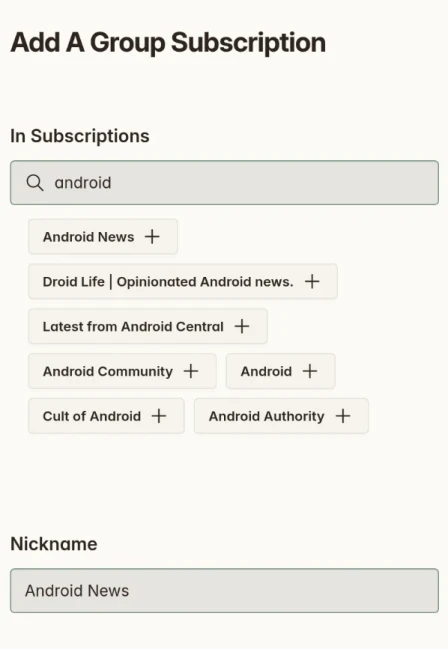
In Foragd, you can create a group subscription that combines many individual feeds into one stream of articles. You can then apply article filters, as shown above, to filter across all the grouped subscriptions. This makes it easy to apply a “divide and conquer” approach across similar topics or sources.
Use Search Subscriptions to Monitor Specific Topics
Search is an underrated but extremely powerful tool for managing content overload. With powerful search, it becomes easy to not only filter, but home in on content of interest.
Most feed readers provide some kind of search functionality. With Foragd, you can search within posts in addition for subscriptions, actions, and other features of the app. While the search bar offers a way to quickly find content by a keyword or phrase, there is also useful filters to further what will be searched.
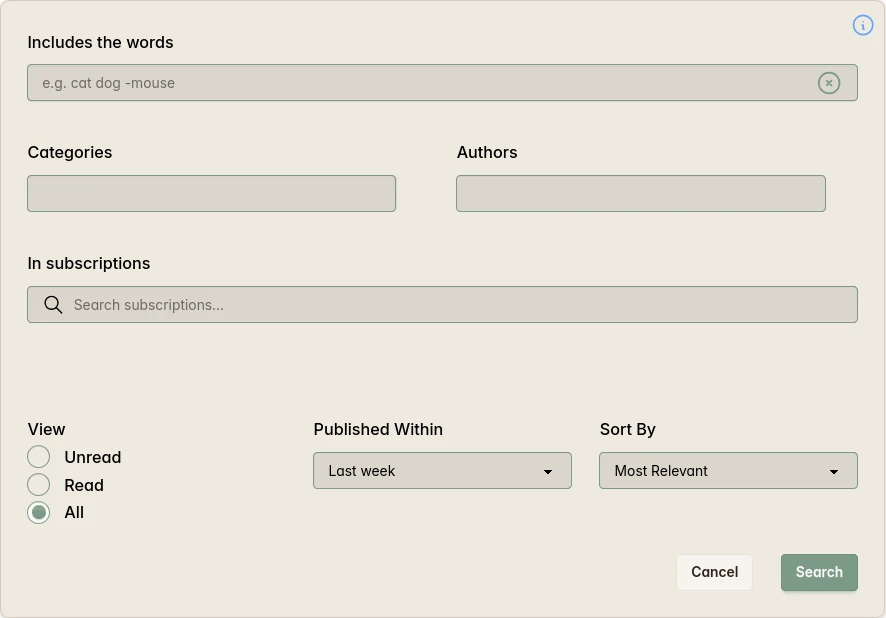
The advanced search dialog in Foragd provides plenty of control over your search, from matching specific authors and categories to filtering by when the articles were published or even their read state.
Additionally, in Foragd, any search can be turned into a Search Subscription. That means once you find the content you are interested in, you can save that search to surface new content that also matches it.
Use Categories to Organize Without Overwhelming Yourself
Finally, another way to manage content is to categorize it. With most feeds, the posts themselves contain categories assigned by the publisher. Foragd exposes these, and you can filter posts by these categories. Additionally, you can assign categories to subscriptions as well, allowing you another way to group and organize them.
A lot of feed readers use “folders” to organize your subscriptions. Often however, a subscription can only be in one folder, when in reality, subscriptions don’t necessarily neatly fall under one thing. Foragd does not have this limit you can apply as many categories as you need to each subscription.
On the other side of this, categories can easily become messy and stop serving a useful purpose. So it’s important, when categorizing, to consider having a limit on them. Something similar to the Johnny Decimal system is useful in this regard. Have just 10 broad, high-level categories you apply across your subscriptions. Within each of those, consider 10 more specific categories to narrow things down. As an example, you might have broad categories like Work and Personal with lots of subscriptions falling under these, and then more specific categories related to Personal like Finances, Health, Fitness, etc.
Review and Clean up Your Subscriptions Occasionally
One of the most powerful tools for managing the overload isn’t a tool feature; it’s just a little bit of discipline. Occasionally, take some time to review your subscriptions and decide which ones might be worth culling. For example, if you find you are constantly skipping over a subscription or have applied a significant number of article filters to it, maybe its time to unsubscribe.
Summary
There a few features in most feed readers that are useful for controlling the flood of content from feeds.
As an example In Foragd:
- Turn off unread counts: Foragd hides them by default to remove the pressure of keeping the number at zero.
- Apply post filters within each subscription to block keywords, phrases, categories, or authors you don’t want to see.
- Create Group Subscriptions to combine multiple related feeds into one view, then apply filters across all of them at once.
- Save searches as Search Subscriptions to automatically surface new content matching your interests across all your feeds.
- Use categories sparingly: the Johnny Decimal approach of 10 broad and 10 specific categories per subscription keeps organization useful rather than overwhelming.
- Take time to maintain your subscriptions: spend some time occasionally reviewing all your subscriptions and unsubscribing from any heavily filtered or constantly skipped subscriptions that indicate low value or noisy sources.
Sign up for Foragd to easily tame the stream of content.
License: CC BY-SA 4.0.