Are Your Feeds Safe? Staying Secure While Staying Updated
Feeds are a great way to stay up to date. But like any content on the internet, it is naive to assume that content is safe
Reading a feed is a safe action right? You trust the person or person(s) who published it right?
In most cases, the answer to both is yes. The vast majority of feeds are completely safe and inert of danger. But that does not mean that feeds cannot be used for malicious purposes. In fact there are well-known exploits and hacks that can be employed through feed content. So it’s worth making sure your feed reader has good security hygiene to protect you from threats. Foragd does and the following article lists some of those important protections, as well as some easy things you can do to further protect yourself.
What Could Be Malicious or Dangerous About a Feed Anyway?
There are many different exploits that can be done with feeds. The biggest avenue is through embedded content in the feed items. The enclosures that would typically load a video or audio clip can be used to also load malicious file or data. They can also trick your reader into running malicious scripts to exfiltrate data or load dangerous content. Even the text itself might contain hidden characters that in combination, could trigger an exploit in the way the reader renders that content.
In the era of LLMs and AI, its possible that we might see new variants of these exploits or even new novel ways to hack with feeds.
How and why does this work? Items in feeds can contain HTML. They are essentially web pages. Web pages can contain dangerous content and so can those feed items. Do you trust every website? No. Should you trust every feed? Also no.
How Foragd Protects You from Malicious Feeds
Foragd takes a defensive stance and assumes all feed content is potentially malicious:
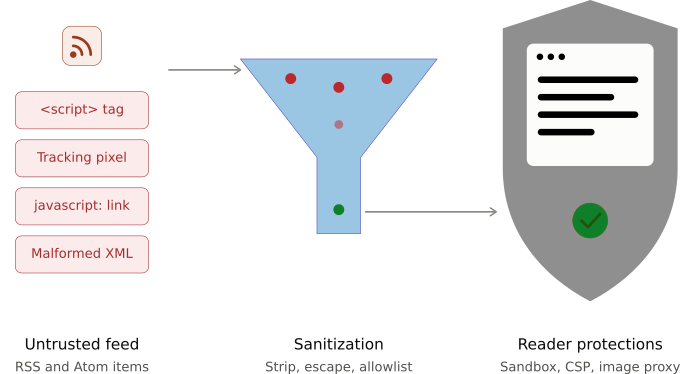
- Even before you browse Foragd, it has performed robust sanitization to the text and data in the feeds, which removes known exploits and dangerous content. Things like embedded scripts and Unicode or whitespace hacks are removed from the data.
- When you browse Foragd, we apply an extensive Content Security Policy and Cross-origin resource sharing configuration, both of which restrict what feed content can display to you in your browser, to known, trusted sources.
Of course, this approach can mean that Foragd may block legitimate content embedded in feeds. If you notice feed content not rendering or missing, please report an issue and we will investigate.
What You Can Do to Stay Secure
Foragd takes a defensive stance to protect you from threats within your feeds. You can also take some easy steps to enhance your protection as well:
- Always keep up to date with updates for your computer or device.
- Always use the latest version of your browser when accessing Foragd. Foragd supports all major browsers, Chrome, Safari and Firefox, as well as others.
- Foragd will never send you an email asking for your personal details. If you receive any suspicious emails that appear to come from Foragd, please let us know!
- Only subscribe to feeds from sources you believe can be trusted. Ensure the URL looks legitimate (the domain matches the site, etc.).
- Avoid mass importing from OPML files you find on places like GitHub or social media, unless you trust the author.
Conclusion
There is no need for panic about your feeds, but its worth being aware that feeds, like anything on the internet, can be dangerous. As such, basic web security equally applies to browsing feeds.
Want to browse feeds more safely? Start a free trial of Foragd and start gathering your own collection of topics, news, and opinions, safely!
License: CC BY-SA 4.0.